How to Use Event Planning Software
PayIt2 makes collecting money simple, secure, and organized.
How to Use Event Planning Software
Event planning software helps organizers manage registrations, collect payments, and keep attendee information organized in one place. Whether you are planning a fundraiser, banquet, reunion, concert, school function, booster activity, or community event, the goal is to make the process easier for both the organizer and the attendee. When event details, signups, and payments are handled through separate tools or manual methods, it becomes harder to stay organized and harder for people to complete registration.
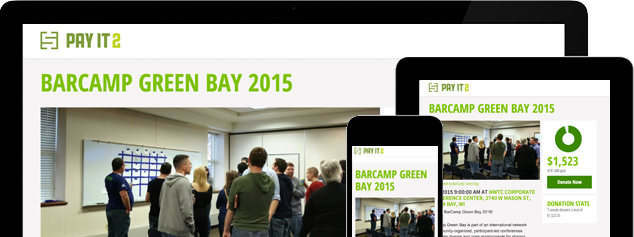
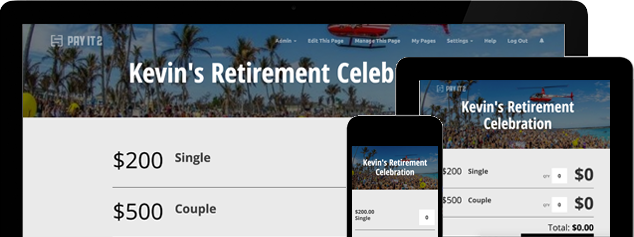
PayIt2 helps simplify one of the most important parts of event planning software: registration and payment collection. Organizers can create a custom Collect Page, add payment or ticket options, and share one link with attendees. Participants visit the page, choose the option that fits them, enter their information, and complete a secure credit-card payment. That makes the event process easier to manage from the start.
Create a Central Event Page
The first step in using event planning software is setting up a page where attendees can register and pay. A central event page gives people one place to go and helps eliminate confusion about how to sign up or where to send payment.
This works well for events such as:
-
Fundraisers
-
Banquets
-
Concerts
-
Reunions
-
School events
-
Booster activities
-
Community gatherings
-
Club or association events
With PayIt2, organizers can create a custom Collect Page that acts as a central location for event registration and payment. That helps make the process more professional and easier to share.
Add Clear Registration or Ticket Options
A useful event planning software setup should let you create options that match the structure of your event. Some events only need one ticket or registration choice, while others need multiple options based on access level, attendee type, or pricing.
For example, your event page might include:
-
General Admission
-
VIP Ticket
-
Student Registration
-
Family Registration
-
Sponsor Option
-
Donation Add-On
Clear options help attendees make faster decisions and reduce confusion. They also help organizers keep registration more organized and easier to track.
Combine Registration and Payment
One of the most important ways to use event planning software effectively is to combine registration and payment in one process. When attendees sign up in one system and pay in another, organizers often have to match records manually and confirm who is actually complete.
PayIt2 helps avoid that problem by letting attendees visit the Collect Page, select their option, enter their information, and complete a secure credit-card payment in one flow. That makes registration simpler for attendees and reduces administrative work for organizers.
This is especially helpful for events that involve:
-
Paid admission
-
Ticket sales
-
Membership fees
-
Fundraiser entry
-
Banquet reservations
-
Deadline-based registration
Share the Event Link
After the event page is ready, the next step is sharing it with attendees. One of the biggest benefits of event planning software is that it allows you to distribute one link instead of separate instructions for signup and payment.
You can share your event page through:
-
Email
-
Text message
-
Group chats
-
Social media
-
School or organization updates
-
Community newsletters
A single event link creates a more consistent experience because everyone sees the same information and follows the same registration process. That can reduce follow-up questions and make event promotion easier.
Track Attendees and Stay Organized
Using event planning software is not just about launching an event page. It is also about staying organized after people begin registering. Organizers need to know who signed up, which option they selected, how much money has been collected, and whether deadlines are approaching.
PayIt2 helps organizers manage this through contribution tracking, registration deadlines, ticket type management, customizable payment items, and organizer dashboards. That means less time spent sorting through spreadsheets and separate systems and more time focused on the event itself.
This can be especially helpful for organizers managing:
-
Recurring events
-
Seasonal programs
-
Fundraiser events
-
Booster activities
-
School functions
-
Ticketed community gatherings
Use One Platform for Different Event Types
Many organizers run more than one kind of event throughout the year. You may need to manage a fundraiser one month, a banquet the next, and a registration-based school or community event later on. Using event planning software that works across different event types helps create a more consistent process.
PayIt2 can support:
-
Fundraisers
-
School events
-
Booster events
-
Banquets
-
Concerts
-
Reunions
-
Club gatherings
-
Community programs
That flexibility helps organizers reuse a familiar process instead of starting over every time a new event is launched.
Conclusion / CTA
Learning how to use event planning software starts with creating one clear event page, offering flexible registration options, combining signup and payment, sharing the page easily, and tracking participation in one place. When those pieces work together, event planning becomes simpler and more organized.
PayIt2 helps organizers create custom Collect Pages, manage registration and ticket options, collect secure online payments, and track participation in one place. Get started with PayIt2 today and create a simpler, more organized event planning experience.
Ready to get started?
Setting up an account is quick, easy and free.