How to Collect Donations Online
PayIt2 makes collecting money simple, secure, and organized.
How to Collect Donations Online
Collecting donations online is one of the easiest ways to make giving more convenient for supporters and more manageable for organizers. Whether you are raising money for a community effort, school activity, local event, group project, booster program, or shared cause, online donations help remove many of the barriers that can slow down fundraising. Instead of relying on cash, checks, mailed payments, or scattered payment requests, you can create one secure place where supporters can contribute quickly and confidently.
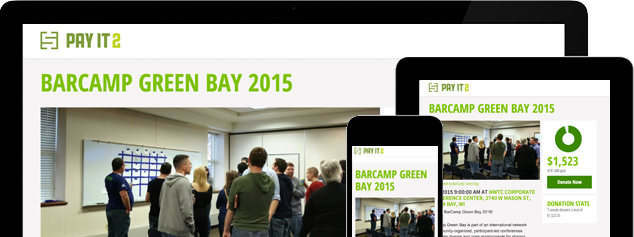
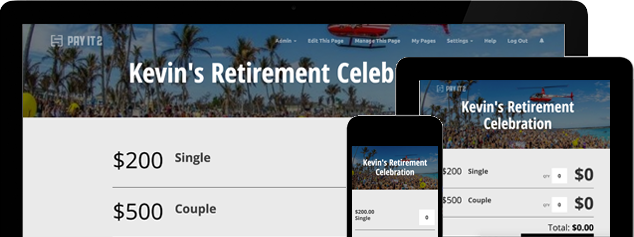
PayIt2 helps simplify online donation collection by giving organizers a custom Collect Page where supporters can choose a payment option, enter their information, and complete a secure credit-card payment. Organizers can customize payment items, share the page with their audience, and track participation in one place.
Tip or Method 1
Create a Dedicated Online Donation Page
The first step in learning how to collect donations online is giving people one clear place to donate. A dedicated online donation page makes the process easier for supporters because it removes confusion and gives them one simple action to take. Instead of sending separate instructions through email, text, or social media, you can direct everyone to one link.
A strong donation page should help supporters quickly understand:
-
What the donations are for
-
How they can contribute
-
Which donation options are available
-
How to complete the payment
PayIt2 helps organizers create custom Collect Pages that centralize the donation process. That makes the fundraiser easier to explain, easier to share, and easier to manage.
Tip or Method 2
Offer Clear Donation Amounts
Many supporters are more likely to donate when they can choose from a few simple options instead of deciding on an amount from scratch. Suggested donation levels help guide the giving process and make the page easier to scan.
For example, you might offer:
-
$10 Donation
-
$25 Supporter Donation
-
$50 Community Donation
-
$100 Sponsor Donation
-
Custom Donation Amount
This kind of structure makes online donation pages feel more organized while still allowing flexibility. Some supporters want a quick decision, while others want to enter their own amount. PayIt2 supports customizable payment options, which helps organizers match the page to the needs of the collection.
Tip or Method 3
Make the Donation Process Easy to Complete
A successful online donation campaign depends on how easy it is for supporters to finish the process. If donors have to search for instructions, figure out where to click, or deal with a confusing checkout flow, some of them may leave before completing their contribution.
That is why the donation experience should be simple. Supporters should be able to:
-
Visit the donation page
-
Choose a donation option
-
Enter their personal information
-
Complete a secure credit-card payment
PayIt2 is designed around that kind of straightforward flow. End users visit the Collect Page, select a payment option, and complete their payment securely online. A simple checkout experience can help improve participation and make the entire donation process feel more professional.
Tip or Method 4
Share the Donation Page Online
Once your donation page is ready, the next step is making sure people can find it easily. One of the biggest advantages of online donations is that the page can be shared quickly across the channels your audience already uses.
You can share your donation page through:
-
Email
-
Text message
-
Group chat
-
Social media
-
Community newsletters
-
School, club, or organization updates
A single shareable link makes the process more consistent because everyone receives the same instructions and the same path to donate. That can reduce confusion and make it easier for supporters to act right away. PayIt2’s custom Collect Pages are built to be shared, helping organizers distribute one page across multiple outreach channels.
Tip or Method 5
Track Donations and Stay Organized
Collecting donations online is not just about receiving payments. It is also about staying organized while the campaign is active. Organizers need to know how much has been collected, who has contributed, and whether the campaign is progressing toward its goal. Without a central system, this often means juggling spreadsheets, screenshots, and message threads.
PayIt2 helps reduce that administrative burden by supporting contribution tracking, organizer dashboards, customizable payment items, and registration deadlines when needed. This gives organizers a better way to monitor donation activity and keep everything organized in one place.
This is especially helpful for donation campaigns connected to:
-
Community events
-
Booster groups
-
School activities
-
Local projects
-
Seasonal campaigns
-
Group-based fundraising efforts
Conclusion / CTA
Learning how to collect donations online starts with creating a process that is easy for supporters and manageable for organizers. A dedicated donation page, clear giving levels, simple checkout flow, easy sharing, and organized tracking can all help improve fundraising results and reduce stress.
PayIt2 helps organizers create custom Collect Pages, offer flexible donation options, accept secure online payments, and track contributions in one place. Get started with PayIt2 today and create a simpler, more organized way to collect donations online.
Ready to get started?
Setting up an account is quick, easy and free.