Collect Money for a Mother’s Day Gift | PayIt2
PayIt2 makes collecting money simple, secure, and organized.
Collect Money for a Mother’s Day Gift
Collecting money for a Mother’s Day gift is a simple way to make group gifting more thoughtful, organized, and affordable. Whether you are planning a gift from siblings, children, grandchildren, coworkers, or a close group of friends, pooling contributions can help everyone participate in something meaningful without putting the full cost on one person.
The challenge is usually not choosing the gift. It is keeping track of who is contributing, following up with reminders, and making sure everything is collected before Mother’s Day arrives. Instead of handling cash, checking several payment apps, or trying to manage a spreadsheet, you can create one secure PayIt2 page and send one link to everyone involved.
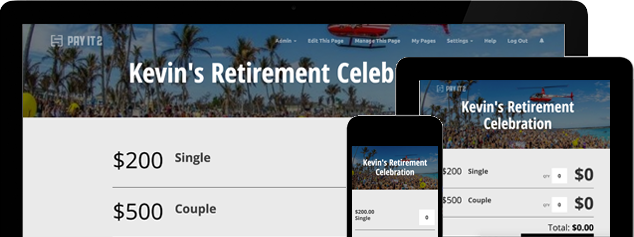
With PayIt2, organizers can create a custom Collect Page, add payment options, share the page, and track contributions in one place. Supporters visit the page, choose an amount, enter their information, and complete a secure online payment. That makes Mother’s Day gift planning easier for families and groups, especially when contributors are in different locations.
How PayIt2 Helps
PayIt2 helps turn a scattered group collection into one smooth experience. You can create a page that explains who the gift is for, what you are collecting for, and when contributions need to be submitted. This makes it easier for people to understand the purpose and contribute quickly.
For a Mother’s Day gift, that might mean collecting for a personalized present, flowers, spa day, brunch, jewelry, a family photo session, travel plans, or a meaningful shared experience. You can offer fixed payment options, flexible giving amounts, or a mix of both depending on your group.
PayIt2 works especially well for Mother’s Day collections such as:
-
Sibling group gifts for Mom
-
Grandchildren contributing to a shared present
-
Family brunch or dinner gift collections
-
Office or team gifts for a mother figure
-
Community appreciation gifts
-
Surprise gifts organized across multiple households
Instead of managing everything through text chains and email threads, organizers can keep the full collection in one place. For a fast setup, you can create your PayIt2 fundraiser page and start collecting right away. You can also learn more about the platform on the PayIt2 welcome page.
Event Planning Considerations
Mother’s Day gift collections have a few unique planning details that matter. The first is timing. Because Mother’s Day has a fixed date, organizers need enough time to collect contributions, purchase the gift, and plan any surprise, delivery, or family gathering around it. Setting a clear deadline helps avoid last-minute stress.
The second is choosing contribution levels that fit your group. A family page may work well with several payment options, while a larger group may respond better to lower entry amounts that encourage broader participation.
A realistic Mother’s Day gift page might include:
-
$10 for a simple contribution
-
$25 for a standard share
-
$50 for a larger contribution
-
Custom amount for flexible giving
It is also helpful to make the purpose of the page clear. Titles and descriptions such as “Mother’s Day Gift for Mom,” “Family Brunch for Mother’s Day,” or “Mother’s Day Surprise Gift Fund” help contributors understand exactly what they are supporting.
If the collection is part of a larger Mother’s Day gathering, lunch, brunch, or event, you may prefer an event-based setup. In that case, you can create your PayIt2 event page and organize related payments in one place.
Example Payment Options
The best payment options for a Mother’s Day gift page should be clear, personal, and easy to understand. Here are a few examples:
-
Mother’s Day Gift Contribution
-
Family Gift for Mom
-
Mother’s Day Brunch Fund
-
Surprise Gift Contribution
-
Group Gift for Grandma
-
Custom Contribution Amount
These payment options make the page feel polished while helping contributors choose the right option quickly. For a family page, “Chip In for Mom’s Gift” may feel warm and personal. For a broader group, “Mother’s Day Gift Contribution” keeps things simple and direct.
You can also tailor the wording to match the gift itself. If you are collecting for an experience, you might use “Spa Day Contribution” or “Weekend Getaway Fund.” If the gift is a shared present, a general contribution label may work best.
Why Use PayIt2
PayIt2 gives organizers one secure place to collect contributions and manage the process from start to finish. Instead of piecing things together across multiple apps and messages, you can handle everything through one clear page.
Why PayIt2 works well for Mother’s Day gift collections:
-
Custom Collect Pages for personal group gifts
-
Flexible payment options for different budgets
-
Easy contribution tracking in one dashboard
-
Simple sharing through one secure link
-
Clear deadlines for time-sensitive gift planning
-
Secure online payments powered by Stripe
This is especially helpful when family members live in different cities or when several people are helping organize the surprise. A single collection page keeps everyone aligned and makes it easier to reach your goal without confusion.
You can also explore more group collection ideas on the PayIt2 homepage, where organizers can see how the platform supports gifts, events, and fundraisers.
Get Started
If you need to collect money for a Mother’s Day gift, PayIt2 makes the process simple, secure, and easy to share. Create a page, explain the gift, add payment options, and send one link to everyone who wants to contribute.
Register for PayIt2 to get started, or create your PayIt2 fundraiser page and start collecting for your Mother’s Day gift today.
Ready to get started?
Setting up an account is quick, easy and free.