How to Collect Money for a Group Gift Online
PayIt2 makes collecting money simple, secure, and organized.
How to Collect Money for a Group Gift Online
Collecting money for a group gift sounds simple until the reminders start, people ask how much they owe, and you lose track of who already paid. Whether you are organizing a coworker birthday gift, a retirement present, a teacher appreciation gift, or a baby shower contribution, the easiest approach is to use one online page where everyone can pay securely and the organizer can track contributions in one place.
PayIt2 makes that process much easier. Instead of chasing cash, managing screenshots, or keeping notes in multiple places, organizers can create a custom Collect Page, add payment options, share the link with the group, and track payments from one dashboard. Contributors visit the page, choose an option, enter their information, and complete a secure credit-card payment through Stripe-powered checkout.
If you need a simple system for group gift collection, this guide covers the best way to set it up and keep it organized from start to finish.
Tip 1: Set a clear goal and contribution amount
Before you ask anyone for money, decide exactly what the group gift is for and how much you want to collect. A clear goal makes it easier for people to respond quickly because they understand the purpose and the amount.
Start with a few simple questions:
-
What is the gift or gift card amount?
-
Are you collecting for wrapping, delivery, or a card too?
-
Is everyone expected to give the same amount, or can people choose what works for them?
-
What is the payment deadline?
For example, if you are collecting for a coworker retirement gift, you may decide to raise $300 for a restaurant gift card, plus $25 for a framed team photo and card. In that case, your total goal would be $325. For a teacher appreciation gift, you may want flexible contribution amounts so families can participate at any level.
This is where online collection helps. Instead of sending a group message that says “just send me whatever,” you can present a more organized request with clear options and a deadline. On PayIt2, organizers can set up customizable payment options so contributors know exactly how to participate.
Tip 2: Use one payment page instead of multiple payment methods
The biggest mistake in group gift collection is using too many channels at once. Cash, Venmo, text messages, email promises, and spreadsheet notes usually turn a simple gift into unnecessary follow-up work.
A single online payment page keeps everything in one place. With PayIt2, you can create a dedicated page for the gift, share it with the group, and let contributors pay securely online. That means no manual counting, fewer reminders, and a more professional experience for everyone involved.
A single page also helps with:
-
keeping the request consistent
-
avoiding confusion about where to pay
-
reducing missed contributions
-
tracking progress in real time
If you also collect for reunions, fundraisers, or shared events, pages like the class reunion payment collection guide and other event-focused resources on your site can reinforce how useful one centralized page can be across many use cases. You can also direct organizers to broader solutions for collecting event payments online when the occasion goes beyond a simple gift.
The easier you make the payment experience, the more likely people are to contribute right away.
Tip 3: Make it easy for people to pay and easy for you to track
Convenience matters. When people have to ask for details, wait for instructions, or remember what they owe, payments get delayed. A good group gift system removes those extra steps.
With PayIt2, the process is straightforward:
-
The organizer creates a Collect Page.
-
The organizer adds payment details or contribution options.
-
The organizer shares the page link with the group.
-
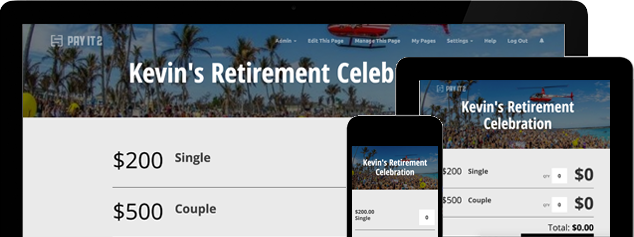
Contributors visit the page, choose a payment option, enter their information, and complete a secure card payment.
-
The organizer tracks contributions from the dashboard.
That built-in contribution tracking is especially helpful for group gifts. You can quickly see who has paid, how much has been collected, and whether you are close to your target. That is much better than scrolling through messages or comparing payment notifications.
This is also useful when you want visibility without awkwardness. For example, if you are organizing a coworker gift, you may not want to repeatedly ask the team for updates. A single page and tracking dashboard allow you to manage the process quietly and efficiently.
For organizers handling more than one collection throughout the year, a resource on membership dues and recurring group payments can also help position PayIt2 as more than a one-time tool.
Tip 4: Communicate the request clearly and professionally
People are more likely to contribute when the request is clear, friendly, and specific. Instead of a vague message, send a short note that explains:
-
what the gift is for
-
why the person is being celebrated
-
the contribution deadline
-
the page link to pay online
For example:
“We’re collecting for Sarah’s baby shower gift from the team. If you’d like to contribute, please use this secure payment page by Friday. We’ll use the total to purchase a group gift and card.”
That kind of message is simple and easy to act on. It gives people everything they need without extra back-and-forth.
A dedicated Collect Page also creates trust. When contributors see a structured payment page rather than a casual request to send money somewhere, the process feels more organized and legitimate. That matters for workplace collections, school gifts, neighborhood gifts, and family events.
If you are building a page for a specific use case, such as teacher gifts or coworker gifts, you can later support this guide with more targeted content that links back to the main group gift page.
Tip 5: Choose a platform that supports secure payments and organizer control
Not every payment tool is built for group organizers. The best option should help you collect money, manage participation, and keep the experience simple for the people contributing.
PayIt2 is designed for that organizer workflow. Features that matter for group gifts include:
-
custom Collect Pages
-
customizable payment options
-
contribution tracking
-
registration or response deadlines when needed
-
organizer dashboards for visibility
-
secure Stripe-powered payments
That combination makes PayIt2 useful for more than just one gift. The same approach can work for office celebrations, retirement parties, class reunions, coach gifts, booster clubs, and small fundraisers.
When evaluating the best way to collect money for a group gift online, look for a platform that reduces admin work. The goal is not just to accept payments. The goal is to make the entire collection process easier to manage.
If you are ready to stop chasing people individually, you can register for PayIt2 and set up your collection in a more organized way. Organizers who want to launch quickly can also create your PayIt2 event page and customize it for a group gift or shared occasion.
Conclusion
The easiest way to collect money for a group gift online is to keep everything in one place. Set a clear goal, create a single payment page, make contribution options simple, and use a system that helps you track who has paid.
PayIt2 gives organizers a clean way to manage group gift collections without the confusion of cash, scattered payment apps, or manual tracking. Contributors get a simple payment experience, and organizers get the visibility they need to stay on top of the collection.
Whether you are organizing a coworker gift, teacher appreciation gift, family contribution, or another shared present, PayIt2 helps you collect money securely and stay organized from start to finish. To get started, register for PayIt2 or start your collection page here.
Ready to get started?
Setting up an account is quick, easy and free.